
Harvest Intake Ticketing
and Lot Traceability
Camvia replaced a manual harvest intake process with a controlled barcode ticketing workflow built for Business Central.
Barcode Lot Traceability
Every intake is tied to a unique lot and barcode for reliable operational traceability.
Controlled Operator Workflow
Role-based access and validation rules help operators enter complete and consistent intake information.
Business Central Ready Records
Clean, standardized intake records are prepared for ERP import and downstream reporting.
From Manual Intake
to a Controlled Workflow
Harvest intake depended on manual setup, repeated data entry, and operator experience. Camvia replaced that process with a guided system designed to standardize intake, improve traceability, and prepare cleaner records for Business Central.
The Challenge
The intake process required too much manual control during a high-volume operational period.
Lot and ticket setup depended on manual entry and operator knowledge.
Repetitive entry created opportunities for inconsistent or incomplete data.
Traceability depended on correctly creating and maintaining lot information.
Peak harvest volume increased the need for a faster, more controlled intake process.
What Camvia Built
A controlled intake application that guides operators through each step and standardizes the resulting data.
Guided data entry with validation rules for more complete and consistent records.
Automatic lot and barcode generation for reliable traceability.
Zebra label printing built directly into the intake workflow.
Role-based controls and standardized export records prepared for Business Central.
A Controlled Intake Process
from Entry to ERP
The application guides operators through each stage of harvest intake, standardizes the information being captured, generates traceable lot records, and prepares clean data for Business Central.
Operator Login
Role-based access controls the operator experience and limits available functions based on user responsibility.
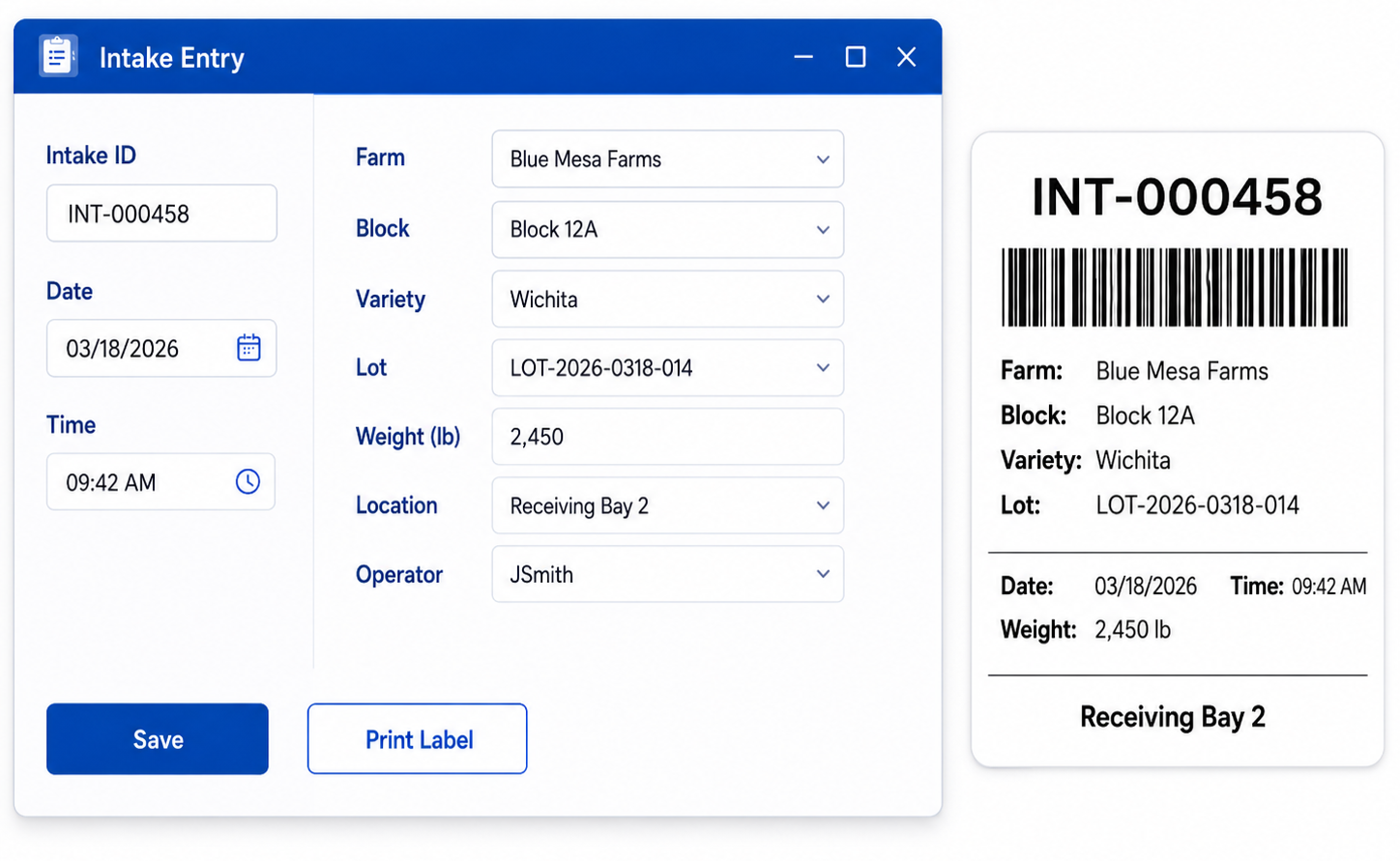
Intake Entry
Operators enter harvest intake details through a structured workflow designed around the information required by the business.
Data Validation
Required fields and validation rules help prevent incomplete, inconsistent, or incorrectly formatted intake records.
Lot + Barcode Creation
The system generates unique lot and barcode information so each intake record can be identified and traced consistently.
Label Printing
Barcode labels are printed directly through Zebra printers as part of the intake process, reducing separate manual steps.
Business Central Ready
Standardized records are prepared for Business Central import and downstream inventory, reporting, and operational workflows.
Operators follow the same workflow every time, helping reduce manual variation while creating cleaner records for inventory and reporting.
Built for the Operator.
Structured for the Business.
The intake application gives operators a controlled interface for entering harvest information while giving administrators the tools needed to manage users, settings, and system behavior.
User and role management
Lot and counter controls
System configuration
From Validated Intake to a Traceable Label
Once the intake record is validated, the system generates the unique lot and barcode information required for traceability and sends the completed 4x6 label directly to a standard Zebra printer.
Required intake information is checked before the ticket is created.
A unique lot and barcode are generated for operational traceability.
The completed label is printed directly as part of the intake workflow.
Client names, farm names, lot details, and sample ticket information have been changed to protect confidential operational data.
A More Reliable Intake Process
During Peak Harvest
The ticketing system reduced manual setup, improved consistency, strengthened lot traceability, and created a more reliable foundation for downstream ERP and reporting processes.
Reduced Daily Setup
Operators can begin intake with less repetitive manual configuration and fewer setup steps before processing tickets.
Improved Lot Traceability
Unique lot and barcode generation creates a clearer connection between physical intake activity and the corresponding digital record.
Reduced Entry Errors
Required fields and validation rules help prevent incomplete records and reduce variation between operators.
Peak-Harvest Support
The workflow was designed to support repeatable ticket creation during periods when intake volume and operational pressure are highest.
ERP Data Foundation
Standardized intake records create cleaner source data for Business Central, inventory processes, and operational reporting.
A controlled intake process built for the realities of harvest operations.
Camvia replaced a manual, operator-dependent process with a structured system that supports traceability, consistency, and cleaner ERP data without adding unnecessary complexity to the operator workflow.